
Real Estate / Local Services / Coaches · Website Build + Webhook + GHL Automation
AI Studio Vibe-Code Websites → GHL Sub-Account Webhook Lead Pipeline
An end-to-end playbook I run for clients: design and vibe-code a high-converting landing page inside AI Studio (Lovable), then wire its submission form to a GoHighLevel sub-account through a custom webhook using the sub-account's API token + location ID. Every external lead — from ads, SEO, referrals, anywhere — is pushed into GHL as an authenticated contact, tagged by source, dropped into the right pipeline stage, and triggers the full automation stack (welcome email, internal alert, SMS, nurture sequence).
Hours (vs days)
Landing Page Build Time
Site + Ads + Partners + Portals
External Sources Wired To GHL
< 1 sec
Webhook → Contact In GHL
0%
Manual Data Entry
Instant
Time From Lead → Automation Fired
The Challenge
Most clients start with three disconnected problems: (1) they have no fast way to spin up a landing page for a new offer, campaign, or sub-market, (2) even when a page exists, form submissions sit inside the form provider and never reach the CRM, and (3) external lead sources (ads, partners, third-party portals) drop leads into inboxes and spreadsheets instead of into an actual pipeline. The result: slow response times, no attribution, and leads that die before anyone touches them.
The Solution
I turn the whole chain into one repeatable system. Step 1 — vibe-code the landing page in AI Studio (Lovable) using natural-language prompts, matching the client's brand and offer. Step 2 — hook the page's form to a custom webhook endpoint. Step 3 — the toughest part — authenticate that webhook against the client's GoHighLevel sub-account using their sub-account API token and location ID, so leads write to the correct account with the correct permissions. Step 4 — inside GHL, an Inbound Webhook workflow parses the payload, creates/updates the contact, tags by source, drops the opportunity into the right pipeline stage, fires internal notifications + welcome email, and starts the nurture sequence. Same architecture works for any external lead source, not just the site.
Step-by-step, exactly how the automation runs
Step 1 — Vibe-Code The Landing Page In AI Studio
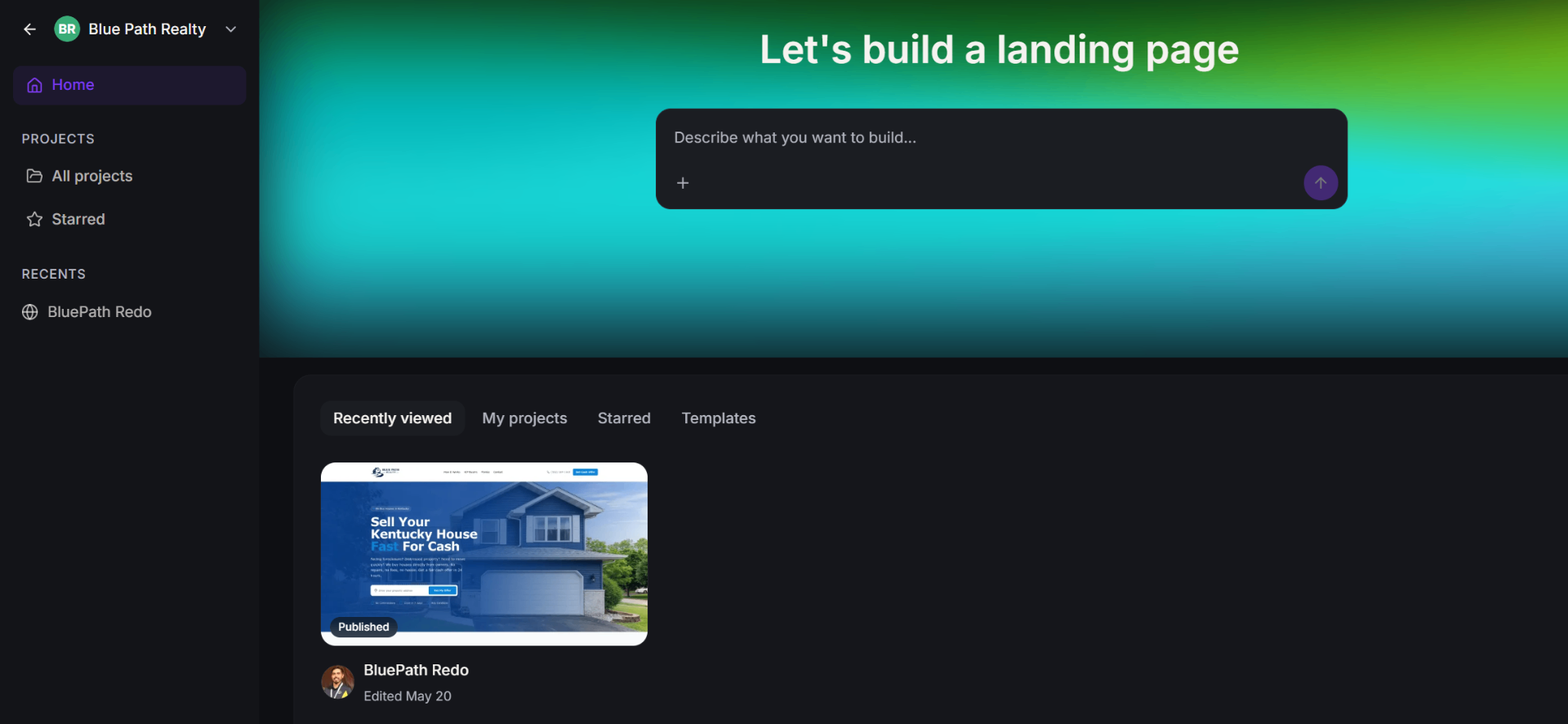
Open AI Studio (Lovable), describe the offer in natural language ('Let's build a landing page for a Kentucky cash-home-buyer'), and iterate on hero, form, testimonials, and CTA sections in minutes. The page is React + Tailwind under the hood, mobile-first, brand-matched, and deployable in one click. This is the fast, low-friction front-end.
Step 2 — Design The Submission Form For Downstream Use
The form fields aren't arbitrary — they're chosen to match what GHL will need later (full name, phone, email, property address, city/state/zip, timeline, motivation, source, utm parameters). Naming them consistently up-front means the GHL workflow can map them 1-to-1 without transformation code.
Step 3 — Publish The Page & Capture The Form Endpoint
Publish the AI Studio site to a subdomain (e.g. go.bluepathrealty.com). Wire the form's submit handler to POST the payload as JSON to a webhook URL we'll create in the next step. This decouples the site from the CRM — the site can be rebuilt or replaced without touching the automation.
Step 4 — Create The GHL Inbound Webhook Trigger
Inside the client's GoHighLevel sub-account → Automation → Create Workflow → Trigger: Inbound Webhook. GHL generates a unique webhook URL. This URL is the doorway every external lead source will use.
Step 5 — The Hard Part: Sub-Account Auth (Token + Location ID)
This is what most people get wrong. When the payload has to write to a specific GHL sub-account (create contacts, tag them, add to opportunities), you can't just call any endpoint — you must authenticate with the sub-account's API token and pass the sub-account's Location ID. I generate a Location-scoped token inside the sub-account settings, store it as a server-side secret, and include it in the webhook call headers so every write lands in the correct account with the correct permissions. Wrong token = 401. Missing location ID = data lands in the wrong sub-account. This step is the reason clients hire me.
Step 6 — Parse Payload & Create / Update Contact
The workflow parses the incoming JSON into GHL Custom Values (custom_value.property_address, custom_value.source, custom_value.utm_campaign, etc.) and maps them onto standard + custom contact fields. Dedupe by email + phone: if the contact exists, update; otherwise create. No duplicates, full history preserved.
Step 7 — Source Tagging & Attribution
Based on utm_source, utm_medium, utm_campaign and the form's own 'source' field, the contact is auto-tagged (facebook-ad, google-ad, seo-organic, referral-partner, portal-import, etc.). These tags drive downstream routing — which pipeline, which nurture, which team member.
Step 8 — Drop Into The Correct Pipeline Stage
The workflow creates an Opportunity in the correct pipeline at the correct entry stage based on the tag. Cash-buyer leads land in the Acquisitions pipeline (Stage: New Lead). Seller leads land in the Seller Intake pipeline (Stage: Needs Contact). Partner-sourced leads land in the Partner Referral pipeline (Stage: Qualifying). Same webhook, different destination.
Step 9 — Fire The Full Automation Stack
Once the contact + opportunity exist, the workflow triggers everything: internal notification (email + in-app) to the assigned rep with the lead's info + direct GHL link, branded welcome email + SMS to the lead within seconds, and enrollment into the source-specific nurture sequence (different follow-up cadence for ad leads vs referral leads vs cold leads).
Step 10 — Reuse The Same Webhook For External Sources
The exact same webhook endpoint now accepts leads from anywhere — Facebook Ads via Zapier/Make, Google Ads lead forms, partner sites, third-party portals like Zillow/PropStream/BatchLeads, even manual CSV imports mapped through Make. One authentication pattern (sub-account token + location ID), one parser, one pipeline router — every new lead source is a same-day integration instead of a rebuild.
Step 11 — Live Result
The client's world becomes: publish a page in AI Studio, plug in a new lead source, and leads flow into GHL tagged, welcomed, in the right pipeline, with the sales rep already notified — all before anyone touches a keyboard. That is the actual product I ship: not a website, but a reusable lead-ingestion nervous system built around their GHL sub-account.
Automation Features
- Vibe-coded landing pages built in AI Studio (Lovable)
- Brand-matched design, mobile-first, fast to iterate
- Custom form submission → webhook pipeline
- GHL sub-account authentication (token + location ID)
- Multi-source lead ingestion (site, ads, partners, portals)
- Auto contact create / update with dedupe
- Source tagging (utm + form source captured)
- Auto pipeline stage placement by lead type
- Instant internal notifications (email + in-app)
- Welcome email + SMS + nurture sequence auto-triggered
Business Benefits
- Landing pages go from idea → live in hours instead of days
- Every lead — from any source — lands in GHL in under a second
- Sales team stops chasing leads across inboxes and spreadsheets
- Response time from hours → seconds
- Clean pipeline visibility by source, campaign, and stage
- Fully reusable architecture — plug in a new source, ship the same day
Technology Stack
AI Studio (Lovable)Vibe CodingCustom WebhookGoHighLevel Sub-Account APISub-Account Token + Location IDInbound Webhook TriggerWorkflowsPipelinesTagsEmail + SMS Automation
"The magic isn't just the site — it's that every lead from every source ends up inside GHL, tagged, in the right pipeline, with the welcome email already sent. That's the part nobody else was doing for us."
Blue Path Realty
Owner