
Service Businesses / Sales Operations · GoHighLevel Pipelines
GoHighLevel Sales Pipelines with Custom Stages
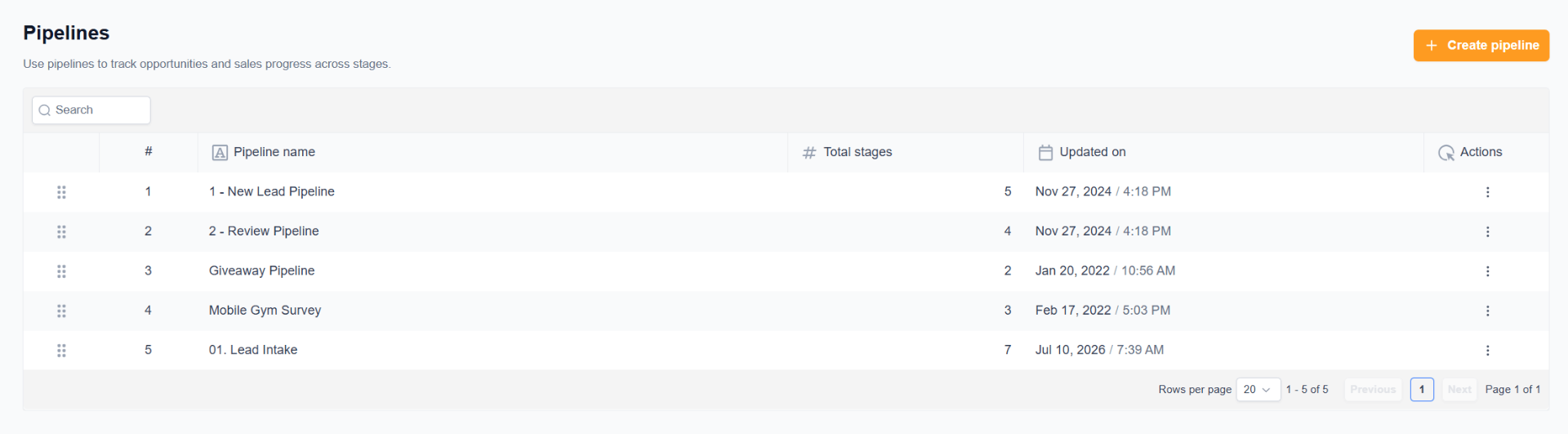
A complete GoHighLevel Pipelines architecture — 5 purpose-built sales & operations pipelines with custom stages that track every opportunity from first touch to intake, review, giveaway conversion, and mobile gym survey conversion. Every lead sits in exactly the right pipeline, at exactly the right stage, at all times.
5
Pipelines Built
21
Custom Stages Configured
7 stages
Longest Pipeline
100%
Team Adoption
100%
Manual Tracking Eliminated
Real-time
Forecast Visibility
The Challenge
The client had no visibility into where opportunities actually stood. Every deal was tracked in someone's head, in spreadsheets, or in scattered CRM notes. There was no consistent sales process, no way to forecast, no way to see which deals were stuck, and no dedicated tracking for special campaigns like giveaways or survey-based follow-ups.
The Solution
I designed and built 5 dedicated GoHighLevel Pipelines, each with its own carefully staged flow: 1 - New Lead Pipeline (5 stages), 2 - Review Pipeline (4 stages), Giveaway Pipeline (2 stages), Mobile Gym Survey (3 stages), and 01. Lead Intake (7 stages). Every opportunity is created in the right pipeline, moves through the right stages automatically as workflows fire, and gives the team a real, visual, drag-and-drop view of the entire business.
Step-by-step, exactly how the automation runs
Step 1 — Map the Business Before Building Anything
Before creating a single pipeline, I mapped every path an opportunity can take through the business — new leads, review requests, giveaway entrants, mobile gym survey respondents, and formal lead intake. Each path became its own pipeline, so no two unrelated processes share the same board.
Pipeline 1 — 1 - New Lead Pipeline (5 stages)
The primary sales pipeline. Every new lead lands here and moves through 5 clean stages from first contact to close. Workflows drop opportunities in at the top stage automatically, and stage advancement is triggered by actions (booked appointment, quote sent, deposit received, closed). This is where the day-to-day sales work happens.
Pipeline 2 — 2 - Review Pipeline (4 stages)
A dedicated pipeline for the reputation / review process. Happy customers are pushed into this pipeline and moved across 4 stages (review requested → review clicked → review posted → verified), so the team always knows which requests are outstanding and which have converted — no more guessing at Google review performance.
Pipeline 3 — Giveaway Pipeline (2 stages)
A lightweight 2-stage pipeline built specifically for giveaway campaigns. Entrants land in stage 1, and winners / converted entrants move to stage 2. Keeps giveaway leads completely separated from real sales opportunities so the main forecast never gets polluted.
Pipeline 4 — Mobile Gym Survey (3 stages)
A 3-stage pipeline that tracks respondents from the Mobile Gym survey through follow-up. Respondent → Contacted → Converted. Purpose-built so the team can work survey follow-ups without them getting lost inside the main lead pipeline.
Pipeline 5 — 01. Lead Intake (7 stages)
The most detailed pipeline in the stack: a 7-stage formal lead intake flow used for higher-touch leads that need qualification, discovery, and structured onboarding before they ever reach the main sales pipeline. Ensures the team follows the exact same intake protocol on every single high-value lead.
Step 3 — Custom Stages Per Pipeline
Every pipeline got stages named in the client's own language — not generic 'Stage 1 / Stage 2' placeholders. Total: 21 custom stages across 5 pipelines, each with a clear entry rule and a clear exit rule so nothing ever sits ambiguously in-between.
Step 4 — Automation-Driven Stage Movement
Pipelines aren't manual. Workflows automatically create opportunities in the right pipeline on trigger events (form submission, survey submission, status change, giveaway entry) and move them across stages when the corresponding action happens (email opened, appointment booked, deposit paid, review posted). The team drags cards only when a human judgment call is required.
Step 5 — Won / Lost / Abandoned Discipline
Every opportunity in every pipeline must eventually resolve as Won, Lost, or Abandoned — with a reason. This gives real reporting data: which sources close, which stages leak, and which campaigns actually produce revenue.
Step 6 — Live Sales Visibility
The end result: a real-time, drag-and-drop view of the entire business across 5 pipelines. Owners can see forecast, team can see workload, and campaigns like giveaways and surveys have their own accountable board — all inside one clean GoHighLevel Pipelines architecture.
Automation Features
- 5 dedicated pipelines for 5 distinct business processes
- Custom stages tailored to each pipeline's real-world flow
- Automatic opportunity creation from workflows
- Automatic stage advancement via triggers
- Visual drag-and-drop opportunity management
- Value tracking per opportunity for forecasting
- Won / Lost / Abandoned reasons on every deal
- Clean separation between lead intake, review, and campaigns
- Ready for reporting and pipeline-value dashboards
Business Benefits
- Full visibility into every opportunity in real time
- Zero deals lost in someone's inbox or head
- Sales forecasting is finally possible
- The team knows exactly which deal to work on next
- Special campaigns (giveaways, surveys) have their own accountable flow
- Repeatable, coachable sales process across the business
Technology Stack
GoHighLevelPipelinesOpportunitiesCustom StagesAutomation TriggersContact TagsCustom FieldsSales Reporting
"For the first time we can actually see our business. Every lead, every review, every giveaway, every survey — it's all in a pipeline, at a stage, and we know exactly what to do next."
Client Name
Owner, Service Business