
Home Improvement / Contractors / Service Businesses · GoHighLevel Automation
Multi-Service Appointment Booking Automation
A single centralized GoHighLevel workflow that listens to every calendar, identifies the appointment type, and automatically routes each contact into the correct downstream automation — replacing a stack of individual workflows.
3,200+
Appointments Processed
99.6%
Automation Accuracy
120+
Hours Saved
1,500+
Manual Tasks Eliminated
2,800+
Customer Records Updated
The Challenge
The client offered multiple services with separate calendars. Managing bookings manually created unnecessary complexity, and each appointment type required its own automation, pipeline and follow-up. They needed one scalable system that could handle every booking automatically without a rebuild every time a new service was added.
The Solution
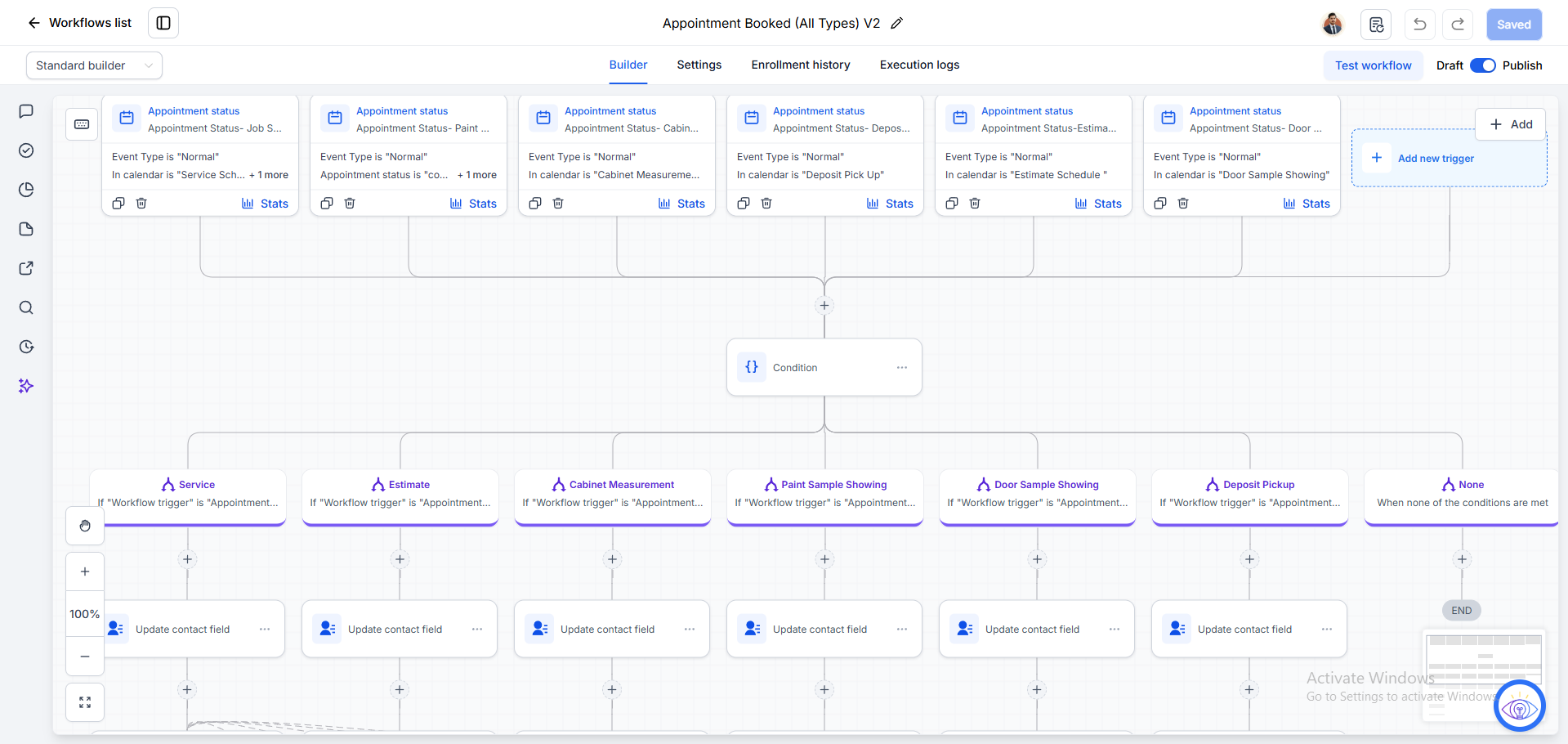
I built a centralized appointment booking workflow inside GoHighLevel that listens for bookings across every calendar. Conditional logic identifies the appointment category, then routes the contact into a dedicated branch that updates the right custom fields and prepares downstream automations. Adding a new service is now a matter of extending one workflow, not building another.
Step-by-step, exactly how the automation runs
Appointment Booked Trigger
Workflow accepts bookings from every calendar: Service Schedule, Estimate Schedule, Cabinet Measurement, Paint Sample Showing, Door Sample Showing, and Deposit Pickup.
Detect Which Trigger Fired
The automation inspects which appointment trigger was received so the rest of the workflow knows what it's dealing with.
Conditional Branching by Category
A single Condition step splits the flow into dedicated branches for Service, Estimate, Cabinet Measurement, Paint Sample Showing, Door Sample Showing, Deposit Pickup, and a None fallback.
Dedicated Automation Path per Type
Each appointment type follows its own branch — so each service can have its own logic without polluting the others.
Update Custom Contact Fields
Every branch writes the correct custom fields on the contact so future automations know exactly which service was booked.
Ready for Downstream Automation
Customer data is now available for reminders, reporting, pipeline moves, and any future automation — from one clean source of truth.
Automation Features
- Multiple appointment triggers
- Multi-calendar support
- Conditional routing
- Intelligent workflow branching
- Automatic contact updates
- Custom field management
- Scalable workflow architecture
- Centralized automation
- Service categorization
- Future automation ready
Business Benefits
- One workflow replaces multiple individual workflows
- Improved scalability as new services are added
- Cleaner CRM organization
- Reduced manual work for the team
- Consistent customer data across every service
- Faster automation execution
- Simplified workflow management
Technology Stack
GoHighLevelWorkflow BuilderCalendar AutomationConditional LogicContact FieldsCRM AutomationCustom FieldsAppointment Routing
"One workflow now runs six services. Every booking lands in the right place, the CRM stays clean, and adding a new service takes minutes instead of days."
Client Name
Operations Lead, Home Services Company